How to make the snap-hole marking template for making leash sleeves
This page describes how to make this 4" x 8" plastic template for marking the snap-hole locations when making "adopt me" leash sleeves:
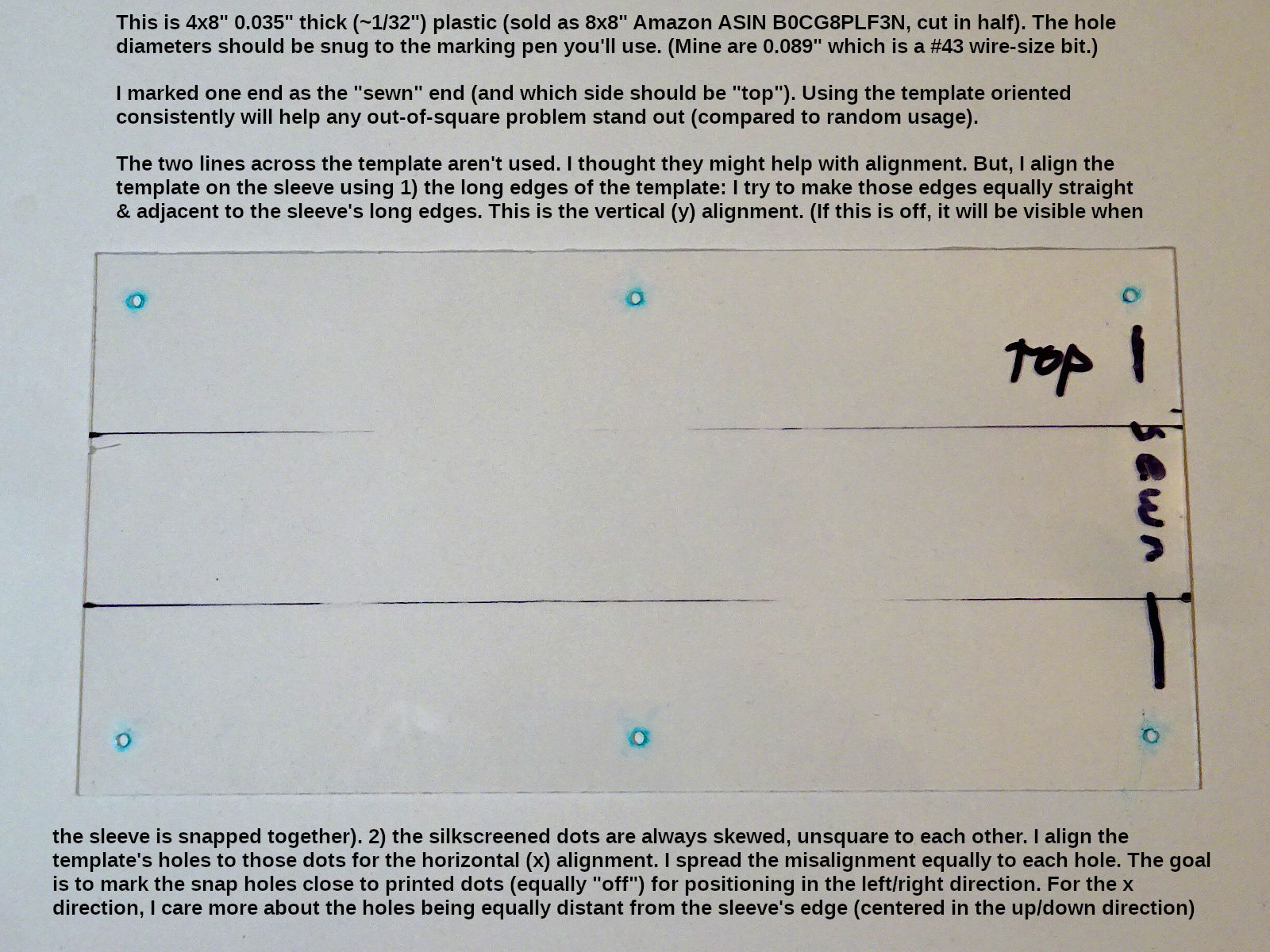
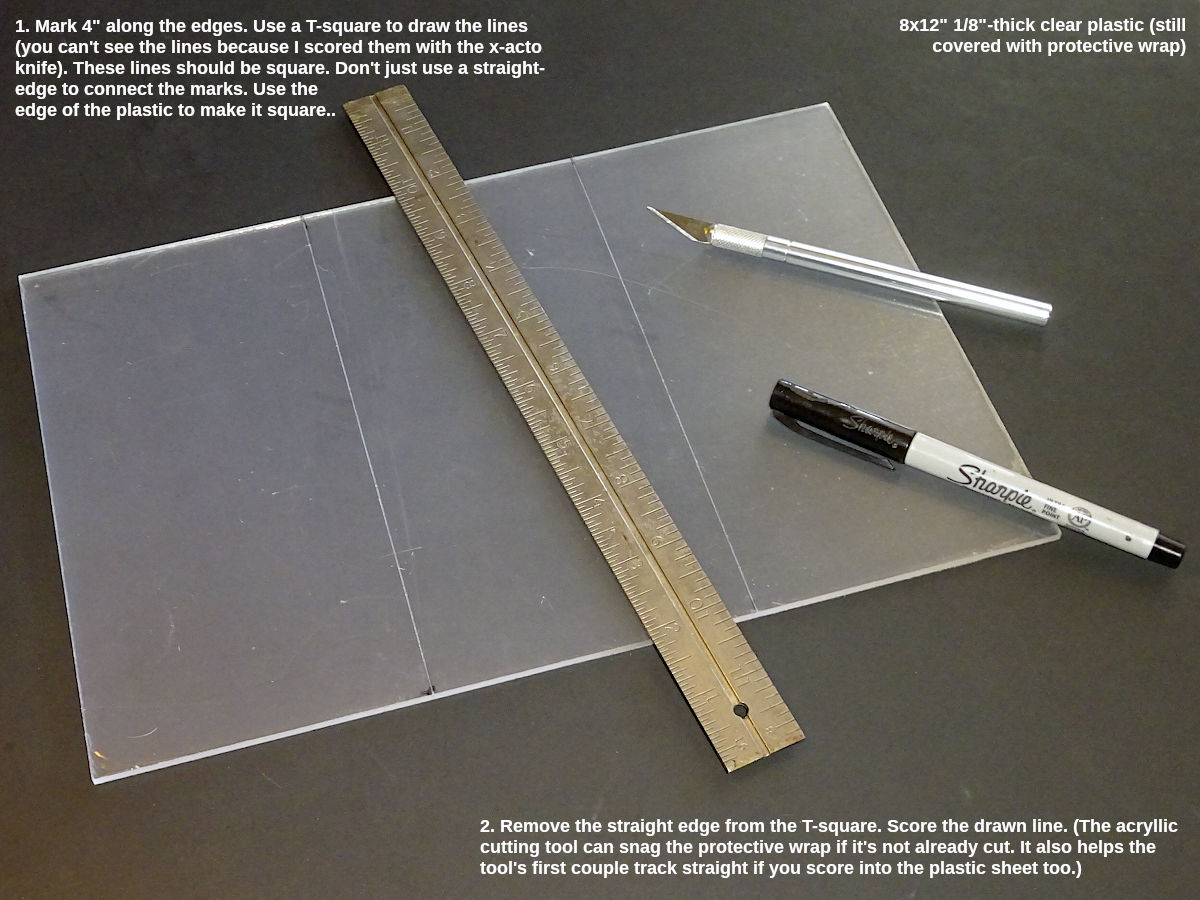
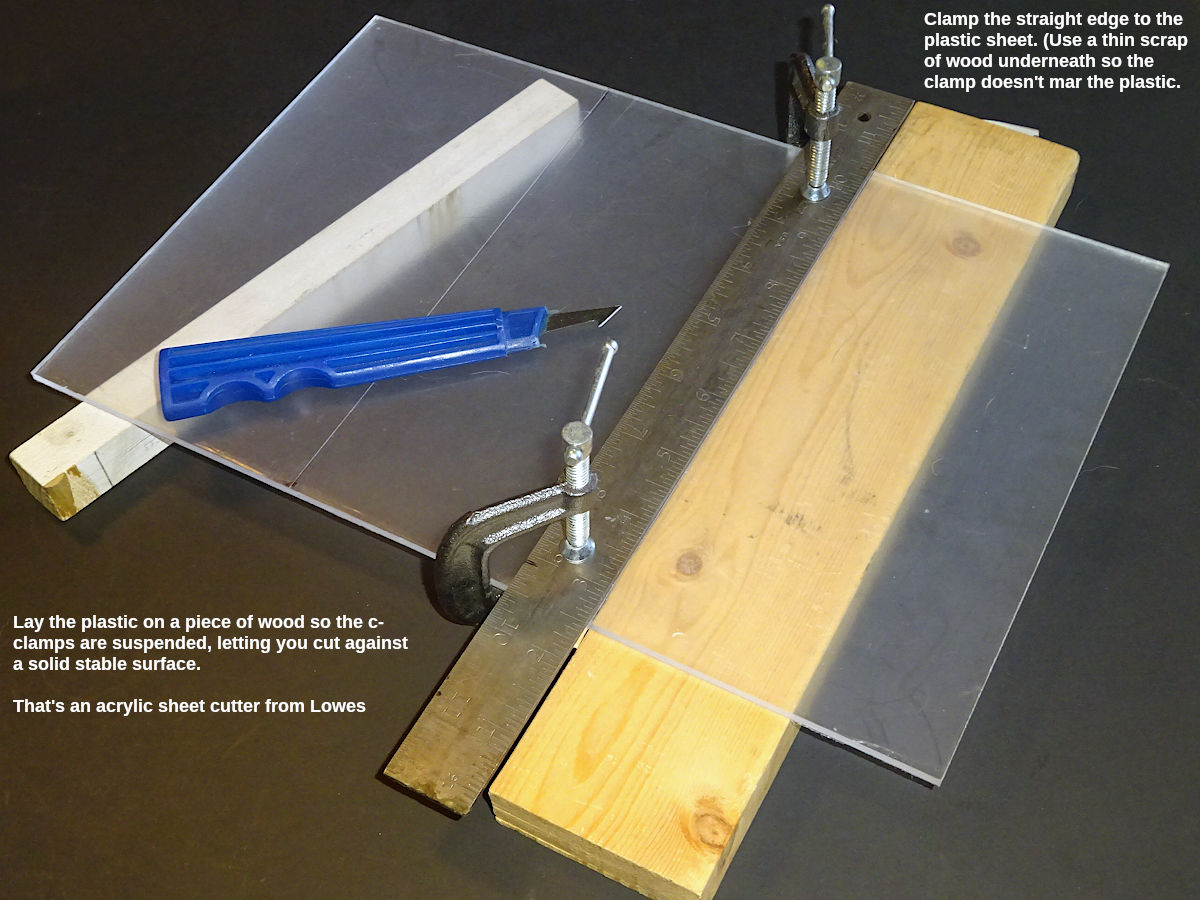
This topic is tedious because those holes must be drilled 1) square to each other. If not, the sleeve's long edge can pucker when snapped together. 2) Perfectly straight. If not, the marker will exit out the hole a little off, as if the holes weren't square to each other. And, 3) centered & and square on the template itself. This aids positioning the template on the sleeve. If the holes aren't centered & square on the template, the sleeve's long edges might overhang each other when snapped together. To make the template shown above, I used a sheet of 8" square clear-plastic, .035" thick (a little thicker than 1/32". Amazon ASIN: B0CG8PLF3N). This is almost too thin. But, it's easier to cut, and less expensive to practice with (make mistakes). I made a new template using a sheet of 1/8"-thick (.125", 8x12". Amazon ASIN: B0CQYS1RN6). That's as thick as 3.6 thin sheets stacked together. It's harder to cut, and more problematic if the drill isn't perfectly vertical (the hole will exit at a different location than where it entered). More reason to use a drill-press. First: mark the plastic using a fine-point Sharpie pen (a traditional Sharpie is too thick.). Mark the lines to cut to get 4" wide pieces. (They can be longer than 8". That direction doesn't matter. But, they should be very close to 4" wide.). Use a T-square to draw the line across the plastic. (It's very important that the cut piece be square. Don't just mark 4" along both edges & lay the straight edge across the plastic from mark to mark. Use the t-square against one edge. If that doesn't align perfectly with the 4" marks you made, split the difference. It's less important to be precisely 4" than it is to be square.) This photo shows the thicker 8x12 plastic: The plastic will probably have a protective film. Don't remove it yet. But, the acrylic cutter may snag it. You should use a razor blade & straight edge to cut the film along that line. You can also continue dragging the razor blade to score the plastic. That can help the cutting tool get started. But, the more you score the plastic, the more you should have the straight edge clamped down (the next step). If all you do is cut the film, you don't need the straight edge clamped down for that. You can hold that down firmly enough just for that. (If you score the plastic, don't press too hard. Start with a few light scores. That will create a track for the blade to stay in. Then you can press harder to score deeper. But still, it's better to do more medium-pressure scores than one hard one.). Before or after cutting the protective film, firmly clamp the straight edge to the plastic using C-clamps: Use a thin piece of wood or plastic so the C-clamp's foot (underneath) won't mar the plastic. Set the plastic on a piece of wood that's tall enough so the c-clamps are suspended freely. You want a solid, sturdy surface to press against. For the 1/8"-thick plastic, it may be better to use a jig saw or band saw. It's very slow cutting with the acrylic cutting tool. You need to start light (like you did scoring with the razor blade above). It will enlarge the score. The deeper that cut becomes, the harder you can press to take more material. But, you can't press too hard or you'll get a rough surface inside the cut which will be hard to go over with the next cut. More passes with medium-to-hard pressure is better. It's important to change direction every 5-6 cuts. That's because: when you start each stroke, you don't start exactly at the edge. Changing directions lets you drag the cutter through the edge which had previously been the starting edge. The edges are most prone to cracking. It's better to work more on the edges that way so they cut deeper than the middle. Also, avoid the temptation to fold it too soon (break it along the cut). It'll probably crack (and especially at the edges unless you worked harder on cutting those deeper than the rest of the cut.). I keep cutting until I can feel it coming though on the other side. Then I look more closely at the edges to make sure they're down low (they're they most vulnerable to cracking). If you get it all down low, it will fold over by itself when it's ready. You can flex it a little to test it. But, don't force it. Eventually it will "give." After the cut is halfway through the plastic, you can remove the straight edge. The cutter should stay in the groove without the need for the guide. (The thicker plastic is hard to cut after you get to a certain depth. Removing the straight edge helps.). If you're not handy with things like this, there's probably sellers online who will sell you 4x8" pieces (custom cut, perhaps). Now you need to mark where to drill the holes. The very first thing to do is mark the word "top" on one side. Make that side the bottom side when you drill the holes. The side marked "top" will be the top side when you use the template to mark sleeves. The reason for this is that you're going to go to great lengths to start the hole exactly positioned. If the drill isn't perfectly straight, it will exit the other side not exactly in that same position where it started. If the top side (when drilling) faces the fabric, then the pen will contact the fabric exactly where you started the hole. It doesn't matter if the pen enters the plastic a little off.[1] You need these holes to be perfectly square to each other (and to the edges of the plastic template, centered within the template's edges). I drew the hole locations in LibreOffice Draw so I can print it & drill through it: You can download that as a printable PDF (with or without dimensions shown). If you need different dimensions, you can download the source and edit that. Using a program ensures perfectly drawn holes. For some people (if they need different distances), it may be easier to draw this the old-fashioned way (graph paper & pencil). If you do that, do your best to make the dots perfectly square to each other. Photocopy your drawing before going further (you may wreck your first attempt. You don't want to have to draw it again.). When you print the template, use a ruler to check if the printed dots are the distances they should be. Printers usually have an option to "scale to fit." See if that's enabled. (You want "100%" or "actual size"). Cut the printed template along the dashed line (which is halfway between the edge of the plastic & the centers of the holes). Cut as close as you can to the dashed line while leaving it visible. That dashed line will help you visually align & center the holes to the plastic sheet's edges. (That's important because not only should the holes be square to each other, but they should also be square with & centered within the plastic sheet.). But, don't leave too much paper. You're going to tape this to the template. If there's too much paper past the dashed line, then the tape won't adhere until it folds over the edge of the plastic. That could allow the paper to move. The tape should adhere to about 3/16" of the plastic surface, then fold over and adhere to the back of the plastic. The more front surface the tape adheres to, the less risk of the paper shifting while you work with it. (But, you need to keep the dashed line to help centering the template squarely within the plastic's edges.). Tape the paper template to the plastic (using scotch tape). You don't want any movement. The paper should not fold over the edges of the plastic. There should be some plastic surface for the tape to adhere to before folding over the edge, and adhering to the back side too. After it's taped, treat it gently. Any movement will wreck this. Use a lot of tape to be sure. Note: In the how-to for making the leash sleeves, I said I shrank my "adopt me" artwork 4% for printing, but not the distance between the snap holes in the y (vertical) dimension (because I don't want to change how the sleeve grips around the leash). The above paper template shows that. The x (horizontal) distance between corner snaps is 7-3/8". The quick-ref dimension is 7-3/4 (3/8 (.375)" longer). But, my y distance between snap holes remains 3-1/4" (same as thequick-ref dimension). The diameter of the holes should match the marking pen you use. For the pen I use (discussed in the making sleeve's how-to "how to mark" section) I used a size #43 (.089") wire-size drill bit. A common 3/32" (0.094") bit would've worked. It's important to not have too loose of a fit between hole and pen. But, not too tight either (removing the pen can pull the plastic template up if the fit is too tight, causing it to move). Wire-size (or "wire gauge," or "numbered") bits give you a lot more sizes to choose from than ordinary fractional-size drill bits. Harbor Freight sells a set. The best way to drill these holes is a drill press. You can find small (8") drill presses that aren't very expensive. (Harbor Freight sells one.). A drill press lets you put the hole exactly where it needs to be, and drill a straight hole (which is more important if the plastic is thick). The steps are pretty simple: Things to keep in mind: If you don't have a drill press (don't want to spend the money to do this just once), I suggest not even trying to use a handheld drill. It won't come out well; won't be square. You can't control a handheld drill enough for this. But, you can drill the holes manually the following way. It's tedious. But, breaking it down into gradual steps to get to the final hole size ensures the holes will be where they should be. They won't be as straight as a drill press. But, you're going to use the template with the side that the hole started from facing the fabric. (That should correct for the hole being less than straight). 1. Before taping the paper template to the plastic, use a straight pin to poke a hole exactly in the center of each printed location. To do this, I laid the paper on an ironing board. (You want a firm, solid surface, but something that will let the pin push through.). This hole will help you do the next step quickly, without having to judge if you're in the center of the printed dot. You can drop into the pierced hole quickly.). I wore a hands-free magnifying glasses to do this so I could use both hands while seeing a closeup to make sure the pin was in the center of the dot. Harbor Freight sells those kinds of magnifiers (clip on your glasses. If you don't wear glasses, buy some cheap reading glasses at the drug store. They're good for seeing close up too. They might be all you need.). 2. Use a lighter to heat the end of a straight pin. (Wear a glove so it doesn't get too hot to hold.). The end of the pin will glow red pretty quickly. Push that hot pin through the pierced hole in the paper. It will melt into the plastic. The pin will cool in 5 seconds, so you have to go fast (or heat it again. This is the reason to pierce the center of the paper dots first. You can hit the center quickly without having to judge it. You'll be in a hurry because the pin cools fast. Don't rush at first. Go a little, re-heat the pin, go further. This melted hole will be your pilot hole. Doing it this way (with the paper pre-punctured, looking at it closely with hands-free magnifying glasses), will be perfectly positioned compared to a handheld drill. Try to hold the pin straight so you get a vertically straight hole. (But, straightness doesn't matter with thin plastic. And, it matters less if you make the side you start the hole from the bottom of the template when you mark the sleeve. I.e., if your hole isn't vertical, it should at least start at the correct location. If that side is against the fabric, then the pen may enter the template "off" a little, but exit onto the fabric where it should. With thin plastic this shouldn't amount to much difference. With thicker plastic it could - and more reason to use a drill press.). You may find that the needle cools and sticks in the hole. Using a "T-pin" gives you some leverage to rotate it free. If you don't use one of those, if you feel the pin start getting stiff/stuck, pull it out immediately (heat it again). Don't wait to see what happens, it can get stuck. (Also, you don't have to go all the way through the plastic. You just need something to guide your first drill bit - the next step.). 3. Remove the paper template. Using the smallest drill-bit size (that's larger than the pin hole): rotate the bit between your index finger & thumb to slowly "drill" through the melted hole, enlarging it. Try to hold the bit straight. Then do it again with a larger size (then the final size). The straightness of the hole doesn't matter as much as starting the hole exactly where it should be. (You'll end up using the starting side as the side facing the fabric when you mark. I.e, the pen will exit the hole where it should be, and touch the fabric there.). As you go, you can set the template on another printed paper template, confirm how the drilled holes align with the printed dots.Materials
Cut the plastic to size
Marking the holes to drill

Drilling the holes
Without a drill press

The above is a little tedious (especially if you don't use a drill press). But, you'll probably only need to do this once. It's worth getting it right. If the snaps aren't perfectly positioned, it won't look right when snapped together.